 ChanghoWoo
BentoML on Kubeflow
Starting with the release of Kubeflow 1.7, BentoML provides a native integration with Kubeflow through Yatai. This integration allows you to package models trained in Kubeflow Notebooks or Pipelines as Bentos, and deploy them as microservices in a Kubernetes cluster through BentoML's cloud native components and custom resource definitions (CRDs). This documentation provides a comprehensive guide on how to use BentoML and Kubeflow together to streamline the process of deploying models at scale.
Requirements
- Kubernetes 1.20 - 1.25
Installation
Run the following command to install BentoML Yatai. Note that the YAML assumes you will install in kubeflow namespace.
kustomize build bentoml-yatai-stack/default | kubectl apply -n kubeflow --server-side -f -
Customizations
You can customize the container repository configurations and credentials for the yatai-image-builder operator to push Bento images to a container registry of your choice.
WARNING: The yatai-image-builder operator requires root privileges because it needs to access the Docker daemon, which requires elevated permissions. Granting root privileges can potentially be dangerous, as it can give a user unrestricted access to the underlying operating system.
dockerRegistry:
  bentoRepositoryName: yatai-bentos
  inClusterServer: docker-registry.kubeflow.svc.cluster.local:5000
  password: ""
  secure: false
  server: 127.0.0.1:5000
  username: ""
You can also supply AWS credentials for the bento-image-builder operator to download the Bento specified in the BentoRequest resource from S3.
aws:
  accessKeyID: ''
  secretAccessKey: ''
  secretAccessKeyExistingSecretName: ''
  secretAccessKeyExistingSecretKey: ''
Update the resources with the following command.
make bentoml-yatai-stack/bases
Re-install and apply resources.
kustomize build bentoml-yatai-stack/default | kubectl apply -n kubeflow --server-side -f -
Upgrading
See UPGRADE.md
Why BentoML
BentoML is an open-source platform for building, shipping, and scaling AI applications.
- Building
- Unifies ML frameworks to run inference with any pre-trained models or bring your own
- Multi-model Inference graph support for complex AI solutions
- Python first framework that integrates with any ecosystem tooling
- Shipping
- Any environment, batch inference, streaming, or real-time serving
- Any public cloud for on-prem deployment
- Kubenetes native deployment
- Scaling
- Efficient resource utilization with autoscaling
- Adaptive batching for higher efficiency and throughput
- Distributed microservice architecture to run services on the most optimal hardware
Workflow on Kubeflow Notebook
In this example, we will train three fraud detection models using the Kubeflow notebook and the Kaggle IEEE-CIS Fraud Detection dataset. We will then create a BentoML service that can simultaneously invoke all three models and return a decision on whether a transaction is fraudulent and build it into a Bento. We will showcase two deployment workflows using BentoML's Kubernetes operators: deploying directly from the Bento, and deploying from an OCI image built from the Bento.
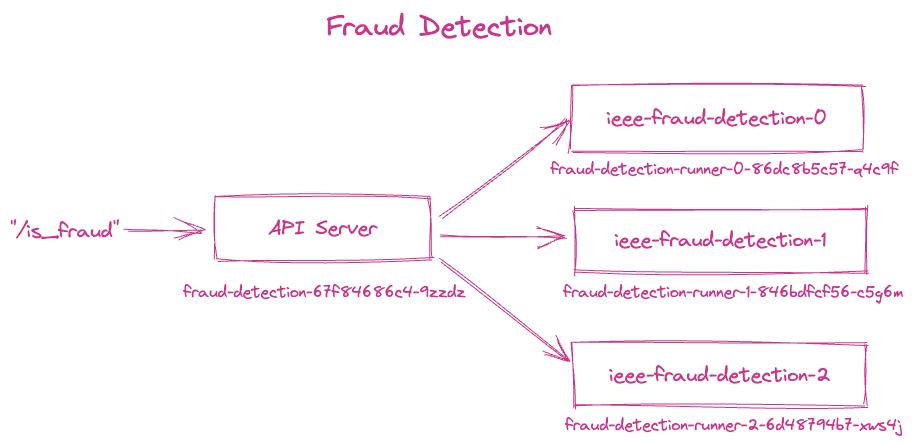
See the Fraud Detection Example for a detailed workflow from model training to end-to-end deployment on Kubernetes.
Workflow on Kubeflow Pipeline
This option will be available in Kubeflow release 1.8.