
 system
d1c10ca6d7
system
d1c10ca6d7
|
1 year ago | |
|---|---|---|
| .. | ||
| assets | 1 year ago | |
| kserve | 1 year ago | |
| models-web-app | 1 year ago | |
| Makefile | 1 year ago | |
| OWNERS | 1 year ago | |
| README.md | 1 year ago | |
| UPGRADE.md | 1 year ago | |
README.md
KServe


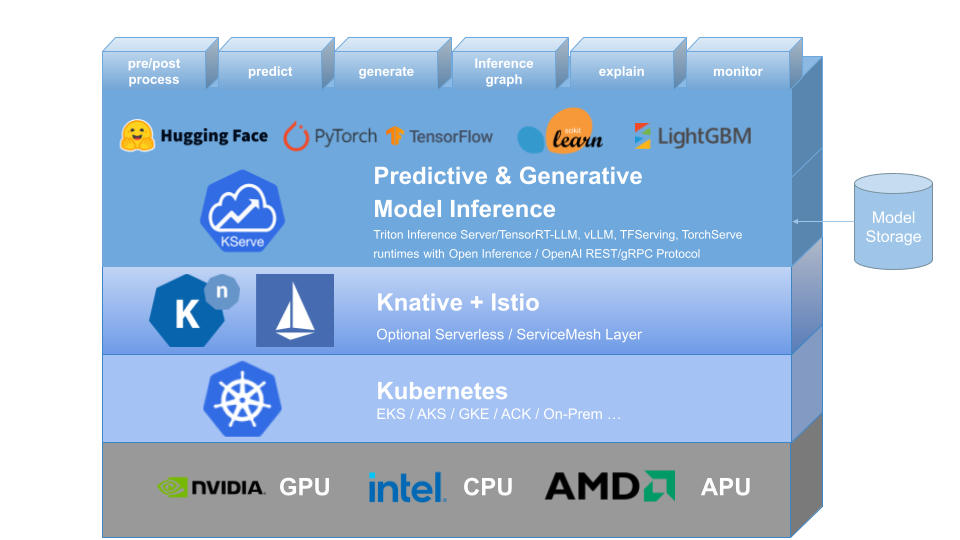
KServe provides a Kubernetes Custom Resource Definition for serving predictive and generative machine learning (ML) models. It aims to solve production model serving use cases by providing high abstraction interfaces for Tensorflow, XGBoost, ScikitLearn, PyTorch, Huggingface Transformer/LLM models using standardized data plane protocols.
It encapsulates the complexity of autoscaling, networking, health checking, and server configuration to bring cutting edge serving features like GPU Autoscaling, Scale to Zero, and Canary Rollouts to your ML deployments. It enables a simple, pluggable, and complete story for Production ML Serving including prediction, pre-processing, post-processing and explainability. KServe is being used across various organizations.
For more details, visit the KServe website.
KFServing has been rebranded to KServe since v0.7.
Why KServe?
- KServe is a standard, cloud agnostic Model Inference Platform for serving predictive and generative AI models on Kubernetes, built for highly scalable use cases.
- Provides performant, standardized inference protocol across ML frameworks including OpenAI specification for generative models.
- Support modern serverless inference workload with request based autoscaling including scale-to-zero on CPU and GPU.
- Provides high scalability, density packing and intelligent routing using ModelMesh.
- Simple and pluggable production serving for inference, pre/post processing, monitoring and explainability.
- Advanced deployments for canary rollout, pipeline, ensembles with InferenceGraph.
🛠️ Installation
Standalone Installation
- Serverless Installation: KServe by default installs Knative for serverless deployment for InferenceService.
- Raw Deployment Installation: Compared to Serverless Installation, this is a more lightweight installation. However, this option does not support canary deployment and request based autoscaling with scale-to-zero.
- ModelMesh Installation: You can optionally install ModelMesh to enable high-scale, high-density and frequently-changing model serving use cases.
- Quick Installation: Install KServe on your local machine.
Kubeflow Installation
KServe is an important addon component of Kubeflow, please learn more from the Kubeflow KServe documentation and follow KServe with Kubeflow on AWS to learn how to use KServe on AWS.
⚒️ Models Web App
The Models web app is responsible for allowing the user to manipulate the Model Servers in their Kubeflow cluster. To achieve this it provides a user friendly way to handle the lifecycle of InferenceService CRs. Please follow the Kserve Models UI documentation for more information.
🚀 Upgrading
For upgrading see UPGRADE.md
🔬 Testing
Testing Kserve
Prerequisite
- Install Python >= 3.8
- Install requirements
pip install -r tests/requirements.txt - Create kubeflow namespace
kubectl apply -k ../../common/kubeflow-namespace/base - Install cert manager
kubectl apply -k ../../common/cert-manager/base kubectl apply -k ../../common/cert-manager/kubeflow-issuer/base - Install Istio
kubectl apply -k ../../common/istio-1-24/istio-crds/base kubectl apply -k ../../common/istio-1-24/istio-namespace/base kubectl apply -k ../../common/istio-1-24/istio-install/base - Install knative
kubectl apply -k ../../common/knative/knative-serving/overlays/gateways kubectl apply -k ../../common/istio-1-24/cluster-local-gateway/base kubectl apply -k ../../common/istio-1-24/kubeflow-istio-resources/base - Install kserve
make install-kserve
NOTE: If resource/crd installation fails please re-run the commands.
Steps
-
Create test namespace
kubectl create ns kserve-test -
Configure domain name
kubectl patch cm config-domain --patch '{"data":{"example.com":""}}' -n knative-serving -
Port forward
# start a new terminal and run INGRESS_GATEWAY_SERVICE=$(kubectl get svc --namespace istio-system --selector="app=istio-ingressgateway" --output jsonpath='{.items[0].metadata.name}') kubectl port-forward --namespace istio-system svc/${INGRESS_GATEWAY_SERVICE} 8080:80 -
Run test
export KSERVE_INGRESS_HOST_PORT='localhost:8080'
make test-kserve
Testing Models WebApp
Prerequisite
- Running kubernetes cluster
kubectlconfigured to talk to the desired cluster.
Steps
- Run the test
make test-models-webapp
🛫 Create your first InferenceService
📘 InferenceService API Reference
🤝 Adopters
📚 Learn More
To learn more about KServe, how to use various supported features, and how to participate in the KServe community, please follow the KServe website documentation. Additionally, we have compiled a list of presentations and demos to dive through various details.