 ChanghoWoo
87 lines
3.8 KiB
Markdown
87 lines
3.8 KiB
Markdown
# BentoML on Kubeflow
|
|
|
|
Starting with the release of Kubeflow 1.7, BentoML provides a native integration with Kubeflow through [Yatai](https://github.com/bentoml/yatai-deployment). This integration allows you to package models trained in Kubeflow Notebooks or Pipelines as [Bentos](https://docs.bentoml.org/en/latest/concepts/bento.html), and deploy them as microservices in a Kubernetes cluster through BentoML's cloud native components and custom resource definitions (CRDs). This documentation provides a comprehensive guide on how to use BentoML and Kubeflow together to streamline the process of deploying models at scale.
|
|
|
|
## Requirements
|
|
|
|
* Kubernetes 1.20 - 1.25
|
|
|
|
## Installation
|
|
|
|
Run the following command to install BentoML Yatai. Note that the YAML assumes you will install in kubeflow namespace.
|
|
|
|
```bash
|
|
kustomize build bentoml-yatai-stack/default | kubectl apply -n kubeflow --server-side -f -
|
|
```
|
|
|
|
## Customizations
|
|
|
|
You can customize the container repository configurations and credentials for the `yatai-image-builder` operator to push Bento images to a container registry of your choice.
|
|
|
|
WARNING: The `yatai-image-builder` operator requires root privileges because it needs to access the Docker daemon, which requires elevated permissions. Granting root privileges can potentially be dangerous, as it can give a user unrestricted access to the underlying operating system.
|
|
|
|
```
|
|
dockerRegistry:
|
|
bentoRepositoryName: yatai-bentos
|
|
inClusterServer: docker-registry.kubeflow.svc.cluster.local:5000
|
|
password: ""
|
|
secure: false
|
|
server: 127.0.0.1:5000
|
|
username: ""
|
|
```
|
|
|
|
You can also supply AWS credentials for the `bento-image-builder` operator to download the Bento specified in the BentoRequest resource from S3.
|
|
|
|
```
|
|
aws:
|
|
accessKeyID: ''
|
|
secretAccessKey: ''
|
|
secretAccessKeyExistingSecretName: ''
|
|
secretAccessKeyExistingSecretKey: ''
|
|
```
|
|
|
|
Update the resources with the following command.
|
|
|
|
```bash
|
|
make bentoml-yatai-stack/bases
|
|
```
|
|
|
|
Re-install and apply resources.
|
|
|
|
```bash
|
|
kustomize build bentoml-yatai-stack/default | kubectl apply -n kubeflow --server-side -f -
|
|
```
|
|
|
|
## Upgrading
|
|
|
|
See [UPGRADE.md](UPGRADE.md)
|
|
|
|
## Why BentoML
|
|
|
|
[BentoML](https://github.com/bentoml/BentoML) is an open-source platform for building, shipping, and scaling AI applications.
|
|
|
|
- Building
|
|
- Unifies ML frameworks to run inference with any pre-trained models or bring your own
|
|
- Multi-model Inference graph support for complex AI solutions
|
|
- Python first framework that integrates with any ecosystem tooling
|
|
- Shipping
|
|
- Any environment, batch inference, streaming, or real-time serving
|
|
- Any public cloud for on-prem deployment
|
|
- Kubenetes native deployment
|
|
- Scaling
|
|
- Efficient resource utilization with autoscaling
|
|
- Adaptive batching for higher efficiency and throughput
|
|
- Distributed microservice architecture to run services on the most optimal hardware
|
|
|
|
## Workflow on Kubeflow Notebook
|
|
|
|
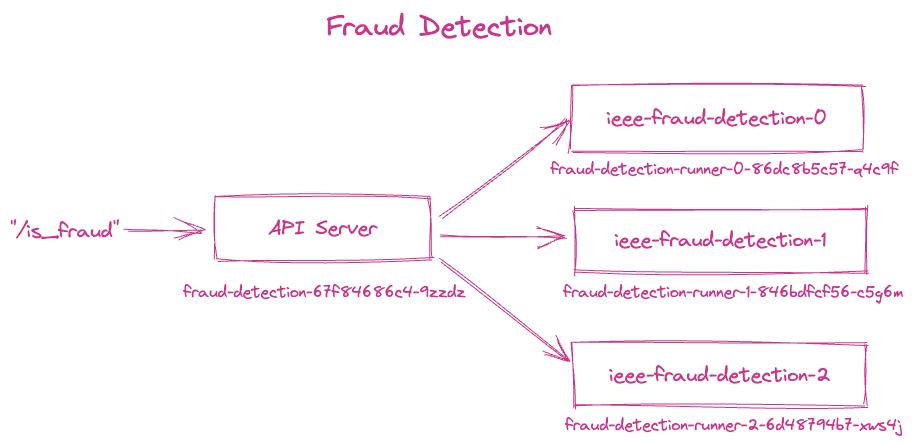
In this example, we will train three fraud detection models using the Kubeflow notebook and the [Kaggle IEEE-CIS Fraud Detection dataset](https://www.kaggle.com/c/ieee-fraud-detection). We will then create a BentoML service that can simultaneously invoke all three models and return a decision on whether a transaction is fraudulent and build it into a Bento. We will showcase two deployment workflows using BentoML's Kubernetes operators: deploying directly from the Bento, and deploying from an OCI image built from the Bento.
|
|
|
|
|
|
|
|
See the [Fraud Detection Example](https://github.com/bentoml/BentoML/tree/main/examples/kubeflow) for a detailed workflow from model training to end-to-end deployment on Kubernetes.
|
|
|
|
## Workflow on Kubeflow Pipeline
|
|
|
|
This option will be available in Kubeflow release 1.8.
|